The time in level report is a fantastic tool to help proactively improve customer retention
Students who remain in the same level for extended periods are more likely to disengage, lose confidence, or question their progress — all of which increase the risk of cancellation
The report is designed to help identify students who have been in the same level for a long period of time.
The time in level report shows
-a students current level,
-how long they have been in that level (days)
-their current lesson day.
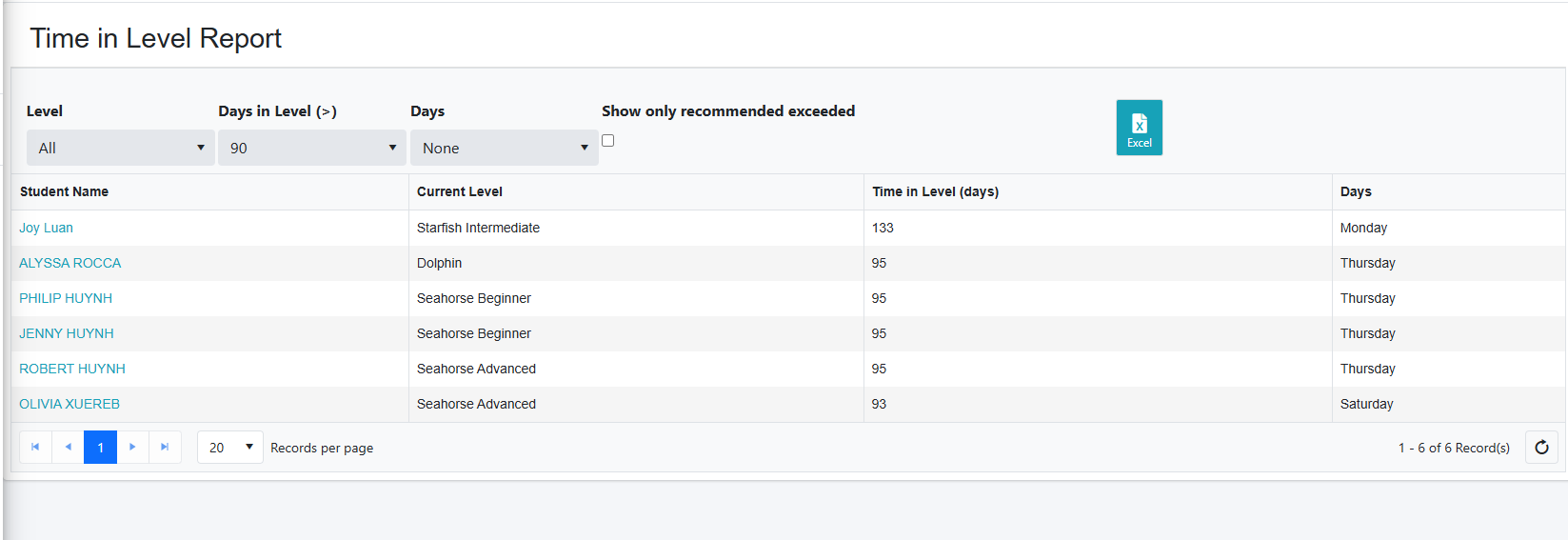
You can filter by level, number of days (> greater than) , days and show only recommended exceeded.
In your settings, you can set a threshold for the recommended time in level maximum for each level.
When you select this option in the report, it will isolate and list students who have exceeded the recommended time in level so you can provide additional focus and attention to these students before they become a higher retention risk.
When the “Recommended time exceeded” filter is enabled, the report isolates students who have been in a level longer than expected. This allows you to proactively:
Review progress and assessment history
Communicate with parents about development
Schedule assessments or targeted coaching
Reduce the risk of disengagement and cancellations
Pro Tip
You can click on a students name in this report to open their profile. Here you may want to review their attendance record to investigate if their lack of progression is a result of non attendance or other factors.
Was this article helpful?
That’s Great!
Thank you for your feedback
Sorry! We couldn't be helpful
Thank you for your feedback
Feedback sent
We appreciate your effort and will try to fix the article