First Class API overview
The First Class API enables customers and partners to securely connect First Class Software with third-party systems and custom applications. It is used to help First Class users build integrations that automate data sharing, streamline workflows, reduce manual administration, and extend the platform’s functionality to suit their business needs. Common use cases include syncing customer or class data, connecting payment or reporting tools, and supporting custom operational processes across other software platforms.
Access to the First Class API is only available under elite subscription plans.
Customers can be provided with documentation and API credentials on request if they have an eligible plan.
Below are some examples of popular available endpoints
Available endpoints
POST Parent: Register a new parent and create a new student
Field | Type | Description |
NdisNumber | string | NDIS participant number |
FirstName | string | Participant first name |
MiddleName | string | Participant middle name |
lastName | string | Participant last name |
gender | string | Participant gender |
dob | datetime (ISO 8601) | Participant date of birth |
age | integer | Participant age |
medicalConditionIds | array of integers | List of medical condition IDs |
mediaConsent | boolean | Whether media consent has been provided |
leadSource | string | Source of the enquiry or referral |
risk | string | Risk classification |
swimmingGoals | string | Participant swimming goals |
behaviouralMedicalIssues | string | Behavioural or medical issues to note |
customerId | integer | Internal customer ID |
parentFirstName | string | Parent/guardian first name |
parentLastName | string | Parent/guardian last name |
parentSecondaryContactName | string | Secondary contact name |
parentSecondaryContactNumber | string | Secondary contact phone number |
emailAddress | string | Parent/guardian email address |
password | string | Account password |
mobileNumber | string | Parent/guardian mobile number |
address | string | Street address |
city | string | City or suburb |
state | string | State or region |
postCode | integer | Postal code |
isDesiredClassAvailable | boolean | Whether the desired class is available |
PUT Student: Update student information
Field | Type | Example / Notes |
ndisNumber | string | NDIS participant number |
firstName | string | First name |
middleName | string | Middle name |
lastName | string | Last name |
gender | string | e.g. Male, Female, Other |
dob | datetime (ISO 8601) | e.g. 2026-03-06T04:29:54.576Z |
age | integer | e.g. 10 |
risk | string | e.g. Low, Medium, High |
swimmingGoals | string | Participant’s swimming goals |
behaviouralMedicalIssues | string | Notes on behavioural or medical issues |
medicalConditionIds | array of integers | e.g. [1, 3] |
Get Classes: Get a list of all available classes within your First Class account
Get Levels: Get a list of all levels within your First-Class account
Get Invoices: Get a list of all levels within a defined date range
api/customers/invoices
To connect to the invoice end point you will require a bearer token.
Use the endpoint by authenticating with the API key and Account Slug (found in account settings)
Use connection/connect
Enter the bearer temp token into the invoices end point along with a date range.
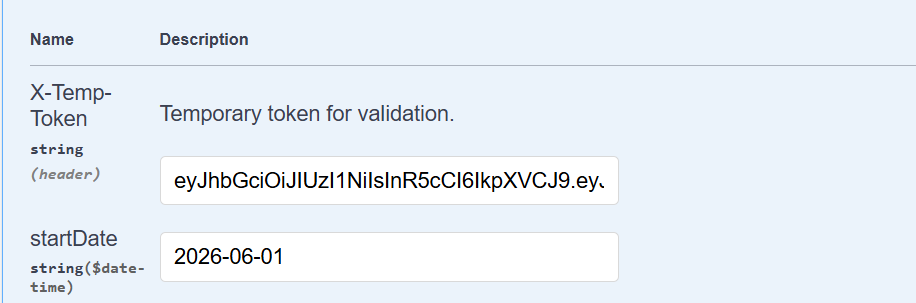
Get Students: Get a list of all students within your First Class account
customers/students
Get Parents: Get a list of all parent records within your First Class account
customers/parents
POST Payments: Pass an invoice number an create a payment record and update the status of the invoice to paid.
Customers/Integration/Pay
{ "invoiceId": 1001, "amountPaid": 0.01, "paymentTypeId": 99, "externalTransactionId": "ABCDEF123456789"
For more information contact support on support@memberretentionsystems.com
Was this article helpful?
That’s Great!
Thank you for your feedback
Sorry! We couldn't be helpful
Thank you for your feedback
Feedback sent
We appreciate your effort and will try to fix the article