Apple pay is available through First Class's integration with Worldpay.
Apple Pay is supported for credit card (Hosted payments)
How to set up Apple Pay as a payment option
Step 1: You must be registered for a Worldpay account and have this connected to First Class by inputting your Worldpay API details into the payment gateway settings (See Payrix settings)
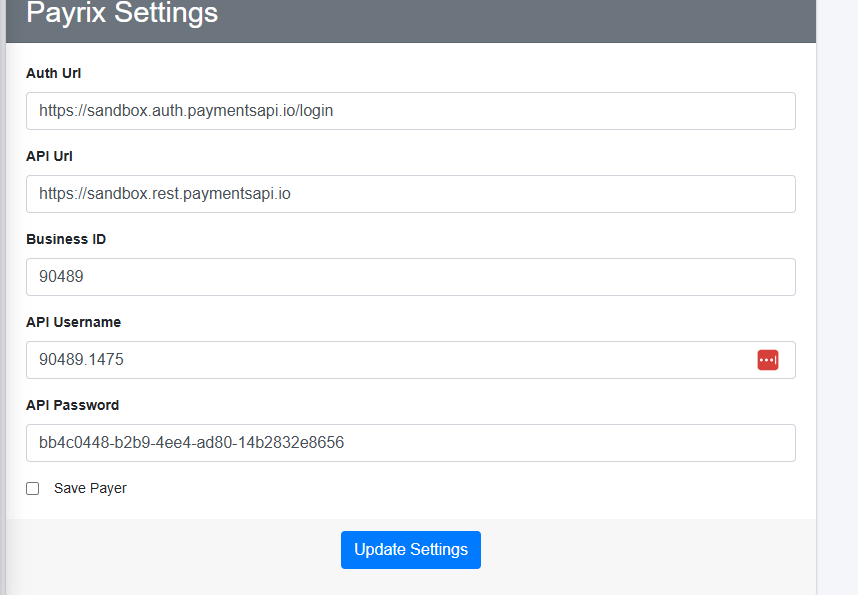
Step 2: At the bottom of the payment gateway settings, there is a tick box option to save payer
This must be un-ticked to allow Apple/Google pay to work.
Step 3: A credit card payment option that is connected to the Worldpay HPP (Payrix) will automatically display Apple/Google pay as an option when a payer selected credit card as their payment type. This option will only display if the user is using a mobile device.
If you would like to enable Apple/Google pay for your organisation, we recommend you speak to First Class support first so they can assist you with the process.
Was this article helpful?
That’s Great!
Thank you for your feedback
Sorry! We couldn't be helpful
Thank you for your feedback
Feedback sent
We appreciate your effort and will try to fix the article